Chapter 5: Large Language Models & Synthetic Text
Large language models have fundamentally transformed how we generate synthetic data. Unlike traditional statistical methods or even GANs, LLMs bring a new capability: the ability to understand intent, maintain coherence over long sequences, and generate realistic text that reflects complex linguistic patterns. In this chapter, we explore the mechanics of using LLMs for synthetic data generation, from prompt engineering fundamentals to production-scale pipelines.
1. The LLM Revolution for Data Generation
The emergence of transformer-based language models—starting with BERT, then GPT-2, GPT-3, and now Claude, Llama, and Mistral—has opened new frontiers in synthetic data generation. These models excel at tasks that require semantic understanding, structural reasoning, and consistency across long contexts.
Why LLMs Change the Game
Traditional approaches to generating synthetic text (templates, rule-based systems, older sequence models) struggle with three core challenges:
- Semantic coherence: Generating text that is both grammatically correct and semantically meaningful across entire documents.
- Diversity and realism: Creating diverse outputs that reflect real-world variation without becoming repetitive.
- Structural constraints: Maintaining consistency across multiple fields, relationships, and logical constraints in tabular data.
LLMs address all three. They've been trained on billions of tokens of diverse text, learning deep patterns about language, logic, and domain-specific knowledge. When you ask an LLM to generate a customer review, patient intake form, or code snippet, it draws on this learned representation to produce realistic, coherent outputs.
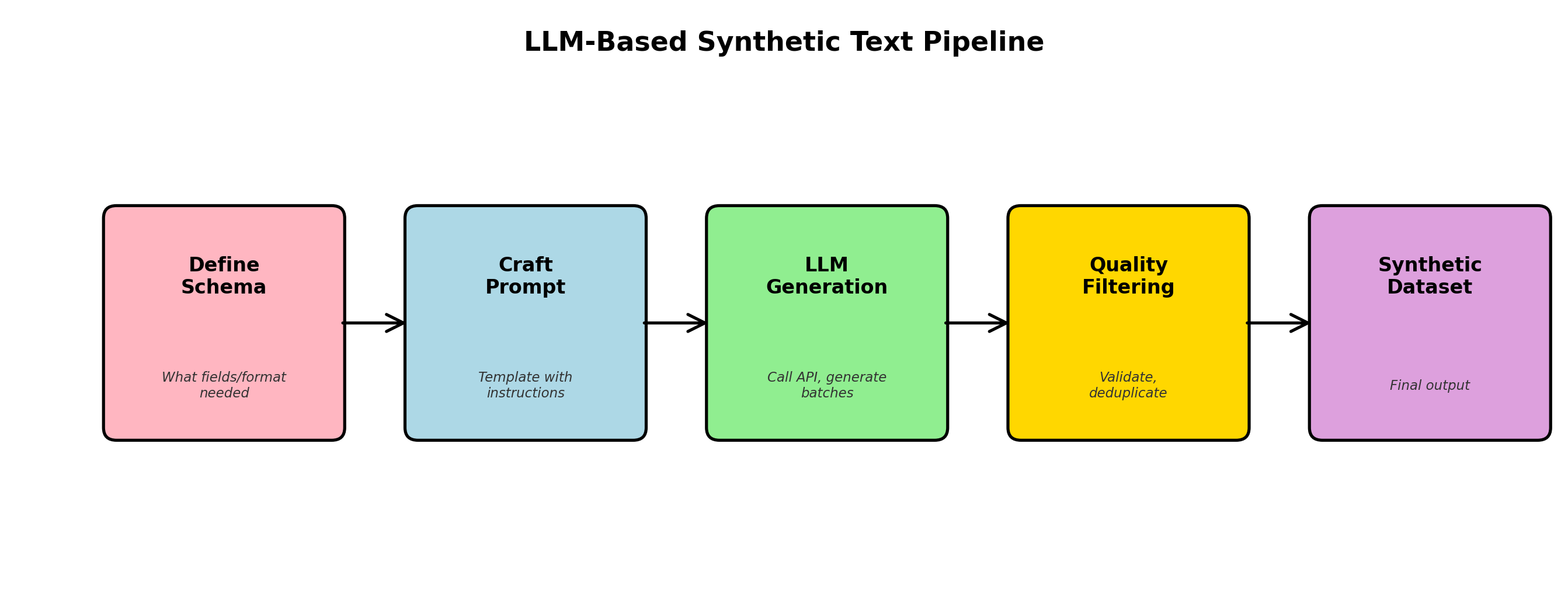
Open-Source vs. API-Based Models
Today's landscape offers two main paths:
| Dimension | API-Based (GPT-4, Claude) | Open-Source (Llama, Mistral) |
|---|---|---|
| Cost per token | $0.01–0.05 per 1K tokens | One-time, then free (self-hosted) |
| Performance | State-of-the-art, closed-source training | Competitive, improving rapidly (Llama 3.1, Mistral) |
| Latency | 100–500ms per request (network overhead) | 10–100ms on GPU (single hop) |
| Data privacy | Shared with provider (unless enterprise plan) | Full control, on-prem deployment |
| Customization | Limited (fine-tuning available at scale) | Full fine-tuning, quantization, adaptation |
2. Prompt Engineering for Data Generation
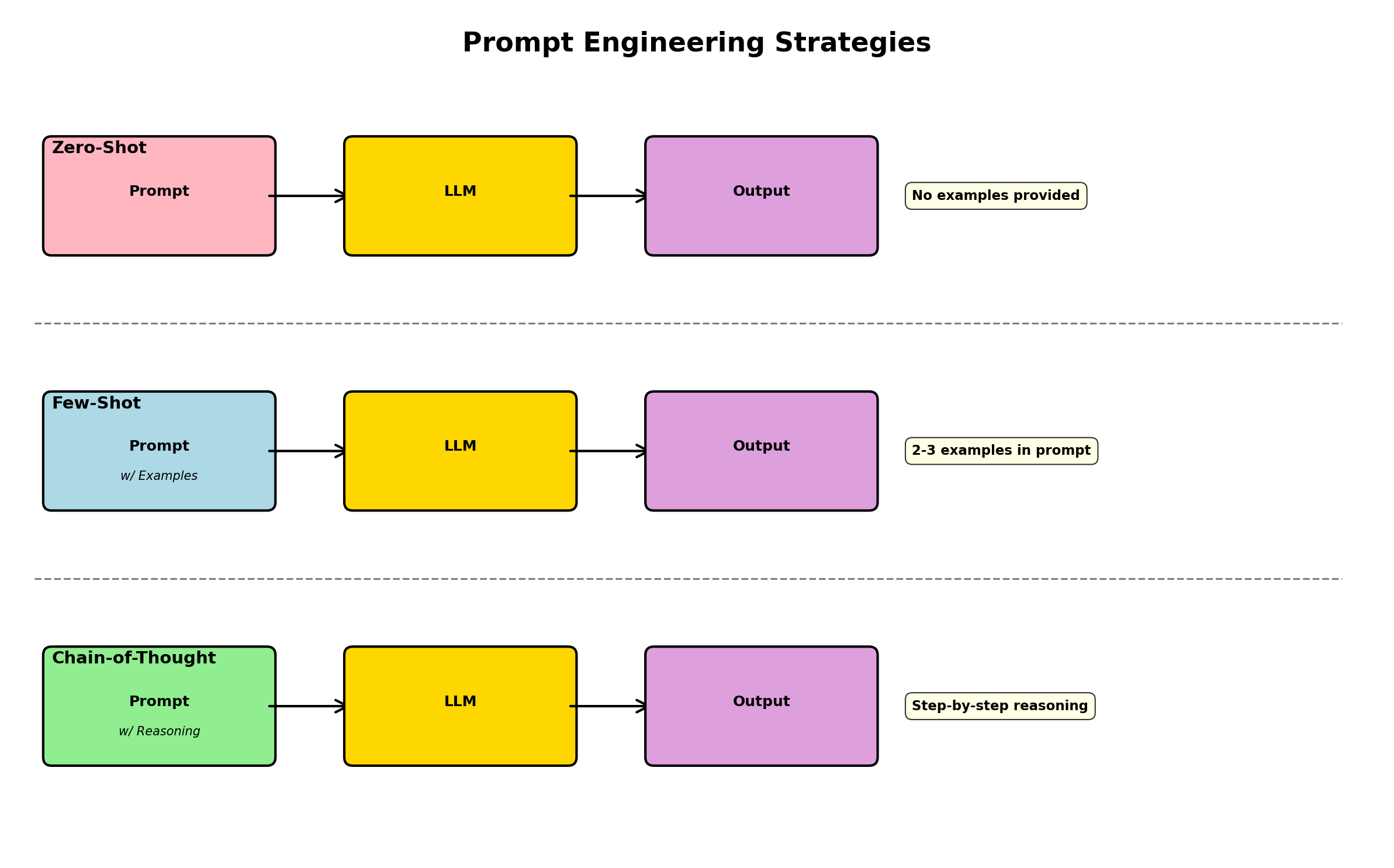
The art of generating high-quality synthetic data with LLMs lies in prompt design. A well-crafted prompt provides the model with context, constraints, and examples—turning a general-purpose language model into a specialized data generator.
Core Principles
1. Explicit schema definition: Tell the model exactly what you want—field names, types, constraints.
2. Few-shot examples: Show 1–3 real examples to establish the pattern. The model will infer structure from these samples.
3. Constraint specification: Clearly list any rules (e.g., "age must be between 18 and 65", "product_price must be greater than cost").
4. Output format: Specify exactly how the output should be formatted (JSON, CSV, plain text with delimiters).
Example: Structured Customer Record Generation
Here's a prompt that generates realistic customer records in JSON format:
"""
You are a synthetic data generator for an e-commerce platform.
Generate diverse, realistic customer records in JSON format.

Schema:
{
  "customer_id": "string (unique identifier, format: CUST_XXXXX)",
  "name": "string (full name)",
  "email": "string (valid email)",
  "signup_date": "ISO 8601 date (between 2020 and 2024)",
  "country": "string (country code, ISO 3166)",
  "lifetime_value": "float (in USD, range 10 to 50000)",
  "subscription_tier": "enum (free, basic, premium, enterprise)",
  "account_status": "enum (active, inactive, suspended)"
}

Constraints:
- If subscription_tier is 'enterprise', lifetime_value must be > 5000
- If account_status is 'inactive', no purchases in last 180 days
- All emails must have valid domains (@gmail.com, @company.com, etc.)
- Names should reflect diverse geographies and cultural backgrounds

Examples (these are real patterns, mimic diversity):
{"customer_id": "CUST_00152", "name": "Aisha Mohammed", "email": "aisha.m@gmail.com", "signup_date": "2021-03-15", "country": "AE", "lifetime_value": 1250.50, "subscription_tier": "premium", "account_status": "active"}
{"customer_id": "CUST_00289", "name": "Chen Wei", "email": "chen.wei.dev@company.com", "signup_date": "2022-07-22", "country": "CN", "lifetime_value": 15000.00, "subscription_tier": "enterprise", "account_status": "active"}

Generate 5 diverse customer records following the schema and constraints. Output only valid JSON objects, one per line.
"""Chain-of-Thought for Complex Records
For highly constrained data, add a "reasoning" step before generation. This is known as chain-of-thought prompting:
"""
Task: Generate a realistic medical appointment record.

Reasoning step: Before generating, think through:
1. What is a reasonable age for this patient?
2. What conditions are common for that age?
3. What medications are appropriate?
4. When should follow-up happen?

Schema: {...appointment fields...}

Constraints:
- appointment_date must be in the future
- If condition is 'diabetes', should have medication 'metformin' or 'insulin'
- follow_up_days should be 0–90 based on severity

Now generate a single appointment record with step-by-step reasoning, then output JSON.
"""
Chain-of-thought prompting increases both quality and consistency, especially for complex or multi-step constraints. The model "reasons through" the problem before generating, leading to fewer constraint violations.
3. Generating Labeled Training Data for NLP
One of the most practical applications of LLMs is creating labeled datasets for NLP tasks. Rather than manually annotating thousands of examples, you can use a capable LLM to generate labeled samples at scale.
Sentiment Analysis Dataset
Here's a complete Python example using OpenAI-compatible APIs (works with OpenAI, Anthropic, or open-source models via vLLM):
#!/usr/bin/env python3
import json
import os
from typing import Any
import httpx

# Configuration (adjust for your provider)
API_BASE = os.getenv("LLM_API_BASE", "https://api.openai.com/v1")
API_KEY = os.getenv("LLM_API_KEY")
MODEL = os.getenv("LLM_MODEL", "gpt-5-mini")

def generate_sentiment_dataset(num_samples: int = 100) -> list[dict[str, Any]]:
    """
    Generate labeled sentiment analysis examples.
    """
    prompt = f"""You are generating training data for a sentiment analysis model.
Create diverse product reviews with ground-truth sentiment labels.

Schema:
{{
  "review_text": "string (product review, 20-100 words)",
  "sentiment": "enum (positive, negative, neutral)",
  "aspect": "string (what aspect of product, e.g. 'quality', 'price', 'shipping')"
}}

Constraints:
- Positive: feedback about value, quality, delivery, or features (includes words like "great", "excellent", "love")
- Negative: complaints about defects, delays, or poor quality (includes words like "terrible", "broken", "useless")
- Neutral: factual statements without strong emotion (e.g. "The box was blue and square")
- Each sentiment should appear roughly equally

Generate {num_samples} distinct review examples. Output only valid JSON, one object per line."""

    # Synchronous client — this function is plain `def`, not `async def`.
    client = httpx.Client(
        base_url=API_BASE,
        headers={"Authorization": f"Bearer {API_KEY}"},
        timeout=60.0,
    )

    response = client.post(
        "/chat/completions",
        json={
            "model": MODEL,
            "temperature": 0.8,  # Higher temp for diversity
            "max_tokens": 4000,
            "messages": [
                {"role": "user", "content": prompt}
            ],
        },
    )

    if response.status_code != 200:
        raise Exception(f"API error: {response.status_code} {response.text}")

    data = response.json()
    content = data["choices"][0]["message"]["content"]

    # Parse JSONL output
    examples = []
    for line in content.strip().split("\n"):
        if line.strip():
            try:
                obj = json.loads(line)
                examples.append(obj)
            except json.JSONDecodeError:
                print(f"Warning: Could not parse line: {line}")

    return examples

if __name__ == "__main__":
    print("Generating 50 labeled sentiment examples...")
    examples = generate_sentiment_dataset(50)

    print(f"Generated {len(examples)} examples:")
    for ex in examples[:3]:
        print(json.dumps(ex, indent=2))

    # Save to file
    with open("sentiment_data.jsonl", "w") as f:
        for ex in examples:
            f.write(json.dumps(ex) + "\n")
    print("Saved to sentiment_data.jsonl")
Named Entity Recognition (NER) Dataset
For NER, you need both text and token-level annotations. This is trickier but LLMs can handle it:
#!/usr/bin/env python3
import json
from typing import Any

def generate_ner_dataset(num_samples: int = 50) -> list[dict[str, Any]]:
    """
    Generate NER training data with BIO tags.
    Uses LLM to create text, then annotate it.
    """
    prompt = f"""Generate {num_samples} diverse sentences about technology companies, products, and people.
For each sentence, provide:
1. The sentence text
2. Token-level BIO tags: B-ORG, I-ORG, B-PRODUCT, I-PRODUCT, B-PERSON, I-PERSON, O (other)

Schema:
{{
  "text": "string (full sentence)",
  "tokens": ["string array of words"],
  "tags": ["string array of BIO tags, same length as tokens"]
}}

Example:
{{
  "text": "Apple released the iPhone 15 last month.",
  "tokens": ["Apple", "released", "the", "iPhone", "15", "last", "month", "."],
  "tags": ["B-ORG", "O", "O", "B-PRODUCT", "I-PRODUCT", "O", "O", "O"]
}}

Generate diverse, realistic examples. Output valid JSON, one per line."""

    # (In real code, call LLM API similar to above)
    # For brevity, showing structure only
return []4. Synthetic Instruction Tuning Data
Modern language models are often fine-tuned on instruction-following examples. Creating such data synthetically is both cost-effective and scalable. Three popular approaches:
Self-Instruct
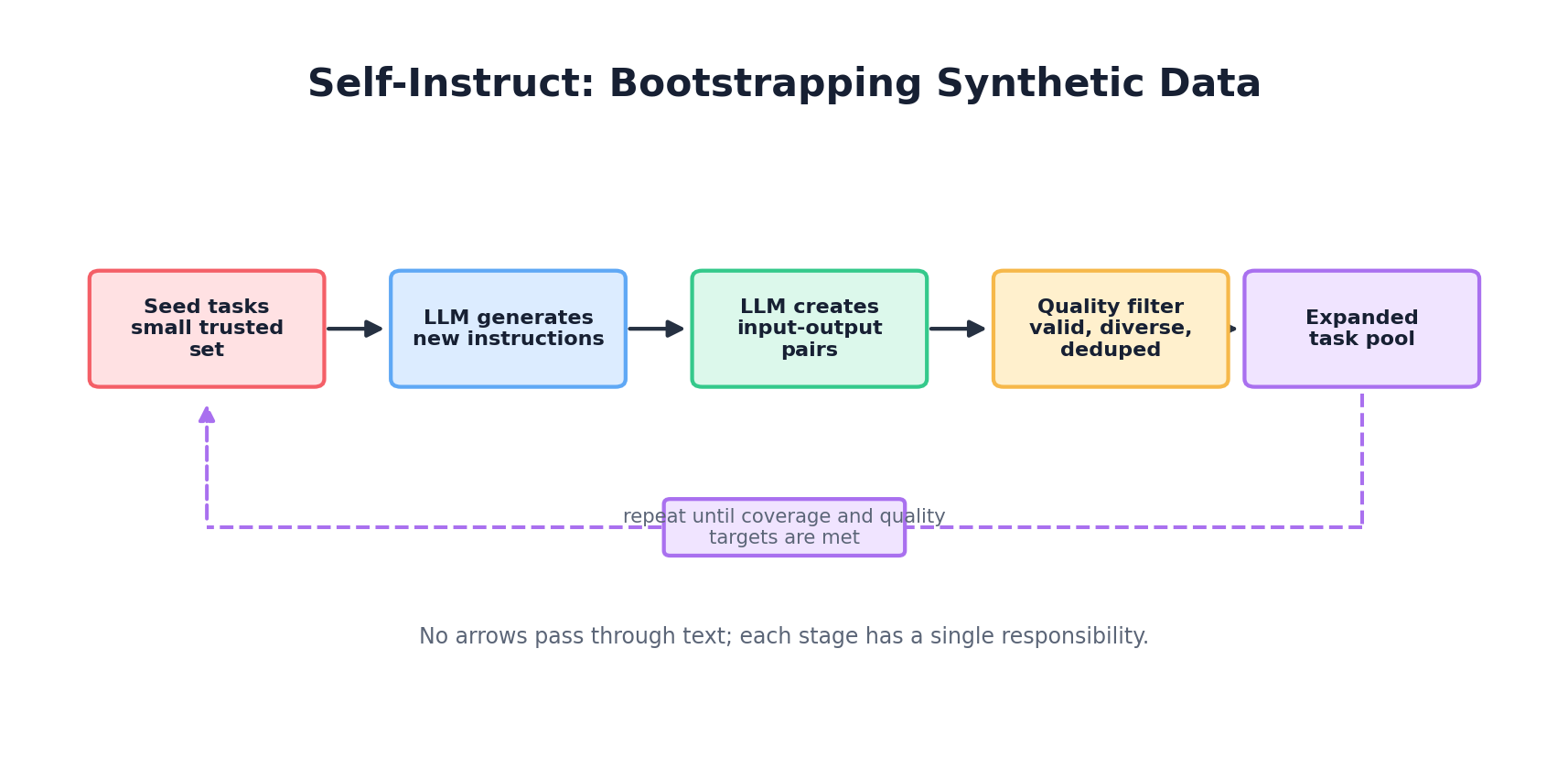
Start with a small seed set of manually written instructions. Use an LLM to generate new instructions and responses. Iteratively filter for quality:
def self_instruct_pipeline(seed_instructions: list[str], num_iterations: int = 3):
    """
    Self-instruct: Use LLM to expand instruction set.
    """
    pool = seed_instructions.copy()

    for iteration in range(num_iterations):
        # Sample a batch from pool
        batch = random.sample(pool, min(10, len(pool)))

        prompt = f"""Based on these existing instructions:
{chr(10).join(batch)}

Generate 5 new, diverse instructions that are similar in style but cover different tasks.
For each instruction, provide:
1. The instruction
2. A realistic example input
3. The expected output

Ensure diversity: mix question-answering, text generation, reasoning, coding, and creative tasks.
Output JSON objects, one per line."""

        # Call LLM
        new_instructions = call_llm(prompt)

        # Filter by quality: remove duplicates, check length, semantic diversity
        filtered = filter_and_deduplicate(new_instructions)

        # Add to pool
        pool.extend(filtered)

    return pool
Alpaca-Style Expansion
The Alpaca model (Stanford) demonstrated generating 52K instruction-tuning examples from just 175 manually written examples by prompt morphing:
def alpaca_expansion(seed_set: list[dict], target_count: int = 52000):
    """
    Alpaca-style: Use seed examples to expand via prompt morphing.

    Each seed example has: instruction, input, output.
    """
    expanded = seed_set.copy()

    while len(expanded) < target_count:
        # Sample a seed example
        seed = random.choice(seed_set)

        prompt = f"""Given this instruction and output:
Instruction: {seed['instruction']}
Input: {seed.get('input', '')}
Output: {seed['output']}

Generate a similar but distinct instruction-input-output triplet.
Vary the task type, domain, or difficulty. Output as JSON."""

        new_example = call_llm(prompt)

        # Check for duplicates and quality
        if is_diverse_and_novel(new_example, expanded):
            expanded.append(new_example)

    return expanded
Evol-Instruct (Evolutionary Prompting)
A more sophisticated approach that iteratively increases instruction complexity:
import random

# Pseudocode helper: replace with your provider-specific LLM call.
def call_llm(prompt: str) -> str:
    raise NotImplementedError

def evol_instruct(seed_instructions: list[str], depth: int = 5) -> list[dict]:
    """
    Evol-instruct: Increase complexity through mutations.
    Mutations: add constraints, increase depth, combine tasks, etc.
    """
    instructions = [{"text": s, "generation": 0} for s in seed_instructions]

    for gen in range(depth):
        new_batch = []
        for instr in instructions:
            if instr["generation"] == gen:
                # Apply random mutation
                mutation = random.choice([
                    "add_constraint",   # Add a condition or requirement
                    "increase_depth",   # Make it multi-step
                    "broaden",          # Generalize to related domain
                    "combine"           # Merge with another task
                ])

                prompt = f"""Instruction: {instr['text']}

Apply this mutation: {mutation}

For 'add_constraint': add a specific requirement or rule.
For 'increase_depth': make it a multi-step or more complex task.
For 'broaden': generalize to similar domains.
For 'combine': merge with a related task.

Output the mutated instruction as a single line."""

                mutated = call_llm(prompt)
                new_batch.append({
                    "text": mutated,
                    "generation": gen + 1,
                    "parent": instr["text"]
                })

        instructions.extend(new_batch)

    return instructions
5. Generating Tabular Data with LLMs
LLMs aren't just for text—they're surprisingly effective at generating structured tabular data (CSV, JSON) with schema constraints. The key is to make constraints explicit and leverage in-context learning.
Customer Transaction Records
#!/usr/bin/env python3
import json
from datetime import datetime, timedelta
import random

def generate_transaction_batch(count: int = 100) -> list[dict]:
    """
    Use LLM to generate realistic transaction records with cross-field constraints.
    """

    # Define schema and examples upfront
    schema = {
        "transaction_id": "unique UUID",
        "customer_id": "CUST_XXXXX format",
        "transaction_date": "ISO 8601 date",
        "amount": "float, USD, 0.01 to 100000",
        "merchant_category": "enum: groceries, electronics, travel, dining, other",
        "payment_method": "enum: credit_card, debit_card, digital_wallet, bank_transfer",
        "status": "enum: completed, pending, failed, refunded",
        "is_international": "boolean",
        "fraud_score": "float 0.0-1.0 (estimated by model)"
    }

    examples = [
        {
            "transaction_id": "TX_92f3c18e",
            "customer_id": "CUST_00152",
            "transaction_date": "2024-01-15",
            "amount": 45.99,
            "merchant_category": "groceries",
            "payment_method": "debit_card",
            "status": "completed",
            "is_international": False,
            "fraud_score": 0.02
        },
        {
            "transaction_id": "TX_18a92d7f",
            "customer_id": "CUST_00289",
            "transaction_date": "2024-01-15",
            "amount": 1200.00,
            "merchant_category": "travel",
            "payment_method": "credit_card",
            "status": "completed",
            "is_international": True,
            "fraud_score": 0.05
        }
    ]

    prompt = f"""You are generating synthetic transaction data for fraud detection training.
Create diverse, realistic transaction records.

Schema:
{json.dumps(schema, indent=2)}

Constraints:
- If is_international=True, amount is likely > 100 and fraud_score > 0.05
- If merchant_category='travel', status is usually 'completed' or 'pending'
- If fraud_score > 0.7, status might be 'failed' or 'refunded'
- If payment_method='digital_wallet', is_international is less common
- Transaction dates should span the last 90 days

Real examples (mimic this style):
{json.dumps(examples, indent=2)}

Generate {count} diverse transaction records. Output only valid JSON, one per line."""

    # (Call your LLM API here)
    response_text = call_llm_api(prompt, temperature=0.7, max_tokens=8000)

    records = []
    for line in response_text.strip().split("\n"):
        if line.strip():
            try:
                record = json.loads(line)
                # Validate before adding
                if validate_transaction(record):
                    records.append(record)
            except json.JSONDecodeError:
                pass

    return records

def validate_transaction(record: dict) -> bool:
    """Validate transaction against schema and constraints."""
    required_fields = ["transaction_id", "customer_id", "amount", "status"]
    if not all(f in record for f in required_fields):
        return False

    # Check types and ranges
    try:
        amount = float(record["amount"])
        if amount <= 0 or amount > 100000:
            return False
    except (ValueError, TypeError):
        return False

    # Check cross-field constraints
    if record.get("is_international") and record.get("amount", 0) < 100:
        # This is OK (weak constraint), allow it
        pass

    return True
6. Quality Control & Filtering
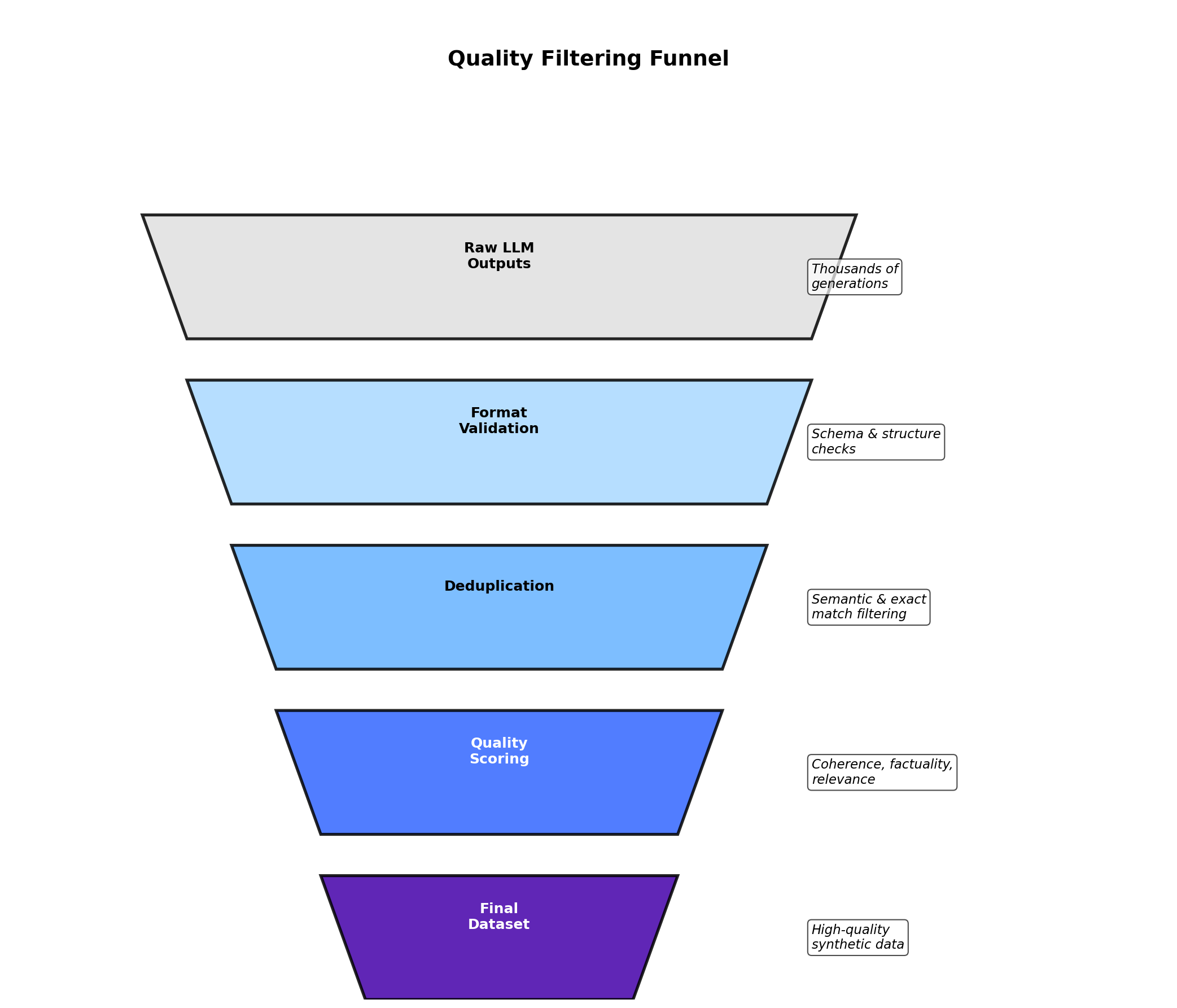
Generated synthetic data is only as good as your filtering pipeline. Here's a practical quality assurance framework:
Multi-Stage Validation
class SyntheticDataValidator:
    """
    Multi-stage validation pipeline for LLM-generated data.
    """

    def __init__(self):
        self.validation_results = {
            "schema_valid": 0,
            "constraint_valid": 0,
            "dedup_kept": 0,
            "semantic_valid": 0,
            "total_rejected": 0
        }

    def validate_schema(self, record: dict, schema: dict) -> bool:
        """Check that record matches schema (types, required fields)."""
        for field, field_type in schema.items():
            if field not in record:
                return False
            # Type checking logic
        return True

    def validate_constraints(self, record: dict, constraints: list[callable]) -> bool:
        """Check cross-field constraints."""
        for constraint_fn in constraints:
            if not constraint_fn(record):
                return False
        return True

    def deduplicate(self, records: list[dict]) -> list[dict]:
        """Remove duplicates and near-duplicates."""
        seen = {}
        unique = []
        for record in records:
            # Use hash of key fields
            key = self._record_hash(record)
            if key not in seen:
                seen[key] = True
                unique.append(record)
        self.validation_results["dedup_kept"] = len(unique)
        return unique

    def _record_hash(self, record: dict) -> str:
        """Create a stable hash of record (ignoring ID fields)."""
        key_fields = {k: v for k, v in record.items() if k != "id"}
        return hash(json.dumps(key_fields, sort_keys=True, default=str))

    def semantic_check(self, text: str, model: Any) -> float:
        """
        Use a classifier or embedding model to check coherence/quality.
        For example, if generating reviews, check sentiment matches labels.
        """
        # Pseudocode: compare text sentiment to label
        predicted_sentiment = model.predict(text)
        return predicted_sentiment

    def filter_pipeline(self, records: list[dict], schema: dict,
                        constraints: list[callable]) -> list[dict]:
        """End-to-end validation."""
        valid = []
        for record in records:
            if not self.validate_schema(record, schema):
                self.validation_results["total_rejected"] += 1
                continue

            if not self.validate_constraints(record, constraints):
                self.validation_results["total_rejected"] += 1
                continue

            self.validation_results["schema_valid"] += 1
            self.validation_results["constraint_valid"] += 1
            valid.append(record)

        # Deduplicate
        valid = self.deduplicate(valid)

return valid7. Cost & Scale Considerations
Generating data at scale with LLMs introduces practical constraints: cost, latency, and rate limits.
Cost Analysis
| Approach | Cost per 1M records | Time to generate | Best for |
|---|---|---|---|
| Frontier API model | Provider-dependent; check live pricing | 10–20 hours (batch) | High quality, small-medium datasets |
| Small API model | Often cheapest managed option; check live pricing | 10–20 hours (batch) | Large datasets, cost-conscious |
| Open-weight model (self-hosted) | Infrastructure only; depends on GPU and utilization | 2–5 hours (4x A100 GPU) | Very large datasets, private data |
| Hosted open-weight model | Provider-dependent; usually between self-hosted and frontier APIs | 5–10 hours | Large datasets, balanced cost/quality |
Batching and Optimization
To minimize latency and cost when generating large datasets:
#!/usr/bin/env python3
import asyncio
from concurrent.futures import ThreadPoolExecutor
import time

class BatchDataGenerator:
    def __init__(self, api_key: str, batch_size: int = 10):
        self.api_key = api_key
        self.batch_size = batch_size
        self.request_queue = []

    async def generate_batched(self, num_records: int, prompt_template: str):
        """
        Generate data in batches with rate limiting.
        """
        all_records = []
        batches = (num_records + self.batch_size - 1) // self.batch_size

        for batch_num in range(batches):
            # Create batch prompt
            batch_prompt = prompt_template.replace(
                "{count}",
                str(self.batch_size)
            )

            # Use exponential backoff for rate limits
            retry_count = 0
            while retry_count < 3:
                try:
                    response = await self._call_llm_async(batch_prompt)
                    batch_records = self._parse_response(response)
                    all_records.extend(batch_records)
                    break
                except RateLimitError:
                    retry_count += 1
                    wait_time = 2 ** retry_count
                    print(f"Rate limited. Waiting {wait_time}s...")
                    await asyncio.sleep(wait_time)

            # Progress tracking
            print(f"Generated batch {batch_num + 1}/{batches}")
            time.sleep(0.1)  # Small delay between batches

        return all_records

    async def _call_llm_async(self, prompt: str):
        """Async call to LLM API."""
        # Implementation uses aiohttp or similar
        pass

    def _parse_response(self, response: str) -> list[dict]:
        """Parse JSONL response."""
        records = []
        for line in response.strip().split("\n"):
            if line.strip():
                records.append(json.loads(line))
return records8. Distillation & Self-Training
A powerful technique: use synthetic data to train smaller, faster, cheaper models. This is called knowledge distillation when the student learns from a teacher model.
Distillation Pipeline
Step 1: Generate synthetic labeled data with a large teacher model (GPT-4).
Step 2: Train a smaller student model (DistilBERT, Llama-7B) on the synthetic data.
Step 3: Evaluate the student against the teacher on held-out real data.
def distillation_pipeline(task: str, num_synthetic: int = 100000):
    """
    Knowledge distillation: Use large model to label data for small model.
    """

    # Step 1: Generate synthetic data with teacher
    print("Step 1: Generating synthetic training data with teacher model...")
    teacher_prompt = f"""Generate diverse {task} examples. Output JSON."""
    synthetic_data = call_llm_api(teacher_prompt, model="gpt-4")

    # Step 2: Train student on synthetic data
    print("Step 2: Training student model on synthetic data...")
    student_model = load_pretrained("distilbert-base-uncased")

    train_dataset = load_dataset_from_synthetic(synthetic_data)
    trainer = Trainer(
        model=student_model,
        train_dataset=train_dataset,
        learning_rate=2e-5,
        num_train_epochs=3
    )
    trainer.train()

    # Step 3: Evaluate
    print("Step 3: Evaluating student on real validation data...")
    real_validation = load_real_dataset("validation.jsonl")
    metrics = evaluate(student_model, real_validation)
    print(f"Accuracy: {metrics['accuracy']:.4f}")
    print(f"F1: {metrics['f1']:.4f}")

    return student_model, metrics
9. Ethical Considerations
Generating synthetic data with LLMs introduces unique ethical challenges:
Bias Amplification
If the teacher LLM was trained on biased data (as most were), synthetic data can amplify those biases. For example:
- Generating customer profiles may overrepresent certain demographics if the original training data did.
- Generating job descriptions may perpetuate gender biases in language.
- Generating medical data may reflect disparities in healthcare access.
Mitigation: Audit synthetic data for demographic parity, stratify generation by protected attributes, and include diverse examples in few-shot prompts.
Attribution and Provenance
Synthetic text, especially from instruction-tuning, may reflect patterns from copyrighted material. While the generated text is new, it encodes knowledge from training data. Best practice: document the source models and training data used, and be transparent with users who consume synthetic data.
Ensuring Diversity
Explicitly prompt for diversity. Instead of "generate 100 customer names", try:
"""Generate 100 diverse customer names representing multiple geographies,
cultures, and naming traditions. Ensure representation from:
- East Asia, South Asia, Middle East, Africa, Europe, Americas
- Both traditionally 'male' and 'female' names
- Various name lengths and phonetic patterns
"""
10. Hands-On: Building a Synthetic NLP Dataset
Let's build an end-to-end pipeline: schema definition, generation, parsing, validation, and export.
#!/usr/bin/env python3
"""
Complete pipeline: Generate, validate, and export a synthetic NLP dataset.
Use case: Customer support ticket classification.
"""

import json
import sys
from typing import Any
from dataclasses import dataclass
import httpx

@dataclass
class Ticket:
    ticket_id: str
    customer_message: str
    category: str  # billing, technical, shipping, account
    priority: str  # low, medium, high
    sentiment: str  # positive, negative, neutral

class TicketDatasetPipeline:
    def __init__(self, api_key: str, model: str = "gpt-5-mini"):
        self.api_key = api_key
        self.model = model
        self.client = httpx.Client(
            headers={"Authorization": f"Bearer {api_key}"}
        )

    def generate(self, count: int = 500) -> list[dict]:
        """Generate synthetic tickets."""
        prompt = f"""Generate {count} realistic customer support tickets.
Each ticket represents a customer contacting support about an issue.

Schema:
{{
  "ticket_id": "TICK_XXXXX (unique)",
  "customer_message": "string (customer's question/complaint, 20-150 words)",
  "category": "enum (billing, technical, shipping, account)",
  "priority": "enum (low, medium, high)",
  "sentiment": "enum (positive, negative, neutral)"
}}

Constraints:
- If category='billing', priority is often 'high'
- If sentiment='positive', priority is often 'low'
- If category='technical', message should mention errors/bugs
- Messages should reflect real support interactions

Examples:
{{"ticket_id": "TICK_00001", "customer_message": "I was charged twice for my order. Can you refund the duplicate charge?", "category": "billing", "priority": "high", "sentiment": "negative"}}
{{"ticket_id": "TICK_00002", "customer_message": "Thanks for the quick shipping! I received my item as expected.", "category": "shipping", "priority": "low", "sentiment": "positive"}}

Generate {count} diverse, realistic tickets. Output only JSON, one per line."""

        response = self.client.post(
            "https://api.openai.com/v1/chat/completions",
            json={
                "model": self.model,
                "temperature": 0.8,
                "max_tokens": 10000,
                "messages": [{"role": "user", "content": prompt}],
            },
        )

        if response.status_code != 200:
            raise Exception(f"API error: {response.status_code}")

        data = response.json()
        content = data["choices"][0]["message"]["content"]

        tickets = []
        for line in content.strip().split("\n"):
            if line.strip():
                try:
                    tickets.append(json.loads(line))
                except json.JSONDecodeError:
                    print(f"Warning: Could not parse: {line}", file=sys.stderr)

        return tickets

    def validate(self, tickets: list[dict]) -> list[Ticket]:
        """Validate and convert to dataclass."""
        valid_tickets = []
        for ticket in tickets:
            try:
                # Type checks
                assert isinstance(ticket.get("ticket_id"), str)
                assert isinstance(ticket.get("customer_message"), str)
                assert ticket.get("category") in ["billing", "technical", "shipping", "account"]
                assert ticket.get("priority") in ["low", "medium", "high"]
                assert ticket.get("sentiment") in ["positive", "negative", "neutral"]

                # Length check
                msg_len = len(ticket["customer_message"].split())
                assert 20 <= msg_len <= 150, f"Message too short/long: {msg_len} words"

                valid_tickets.append(Ticket(**ticket))
            except (AssertionError, KeyError, TypeError) as e:
                print(f"Invalid ticket: {e}", file=sys.stderr)

        return valid_tickets

    def deduplicate(self, tickets: list[Ticket]) -> list[Ticket]:
        """Remove duplicates based on message text."""
        seen = set()
        unique = []
        for ticket in tickets:
            msg_hash = hash(ticket.customer_message)
            if msg_hash not in seen:
                seen.add(msg_hash)
                unique.append(ticket)
        return unique

    def export_jsonl(self, tickets: list[Ticket], filepath: str):
        """Export to JSONL format."""
        with open(filepath, "w") as f:
            for ticket in tickets:
                f.write(json.dumps({
                    "ticket_id": ticket.ticket_id,
                    "customer_message": ticket.customer_message,
                    "category": ticket.category,
                    "priority": ticket.priority,
                    "sentiment": ticket.sentiment
                }) + "\n")
        print(f"Exported {len(tickets)} tickets to {filepath}")

    def export_csv(self, tickets: list[Ticket], filepath: str):
        """Export to CSV format."""
        import csv
        with open(filepath, "w", newline="") as f:
            writer = csv.DictWriter(f,
                fieldnames=["ticket_id", "customer_message", "category", "priority", "sentiment"])
            writer.writeheader()
            for ticket in tickets:
                writer.writerow({
                    "ticket_id": ticket.ticket_id,
                    "customer_message": ticket.customer_message,
                    "category": ticket.category,
                    "priority": ticket.priority,
                    "sentiment": ticket.sentiment
                })
        print(f"Exported {len(tickets)} tickets to {filepath}")

    def run_pipeline(self, count: int = 500) -> tuple[list[Ticket], dict]:
        """Run complete pipeline: generate -> validate -> deduplicate -> export."""
        print(f"Generating {count} synthetic tickets...")
        raw_tickets = self.generate(count)
        print(f"Generated {len(raw_tickets)} raw tickets")

        print("Validating...")
        valid_tickets = self.validate(raw_tickets)
        print(f"Valid: {len(valid_tickets)} tickets")

        print("Deduplicating...")
        unique_tickets = self.deduplicate(valid_tickets)
        print(f"After dedup: {len(unique_tickets)} tickets")

        # Export
        self.export_jsonl(unique_tickets, "tickets.jsonl")
        self.export_csv(unique_tickets, "tickets.csv")

        # Summary stats
        stats = {
            "total_generated": len(raw_tickets),
            "total_valid": len(unique_tickets),
            "category_dist": self._category_distribution(unique_tickets),
            "priority_dist": self._priority_distribution(unique_tickets),
            "sentiment_dist": self._sentiment_distribution(unique_tickets)
        }

        return unique_tickets, stats

    def _category_distribution(self, tickets: list[Ticket]) -> dict:
        dist = {}
        for ticket in tickets:
            dist[ticket.category] = dist.get(ticket.category, 0) + 1
        return dist

    def _priority_distribution(self, tickets: list[Ticket]) -> dict:
        dist = {}
        for ticket in tickets:
            dist[ticket.priority] = dist.get(ticket.priority, 0) + 1
        return dist

    def _sentiment_distribution(self, tickets: list[Ticket]) -> dict:
        dist = {}
        for ticket in tickets:
            dist[ticket.sentiment] = dist.get(ticket.sentiment, 0) + 1
        return dist

# Main execution
if __name__ == "__main__":
    import os
    api_key = os.getenv("OPENAI_API_KEY")
    if not api_key:
        raise ValueError("Set OPENAI_API_KEY environment variable")

    pipeline = TicketDatasetPipeline(api_key)
    tickets, stats = pipeline.run_pipeline(count=500)

    print("\n=== SUMMARY STATS ===")
    print(f"Category distribution: {stats['category_dist']}")
    print(f"Priority distribution: {stats['priority_dist']}")
print(f"Sentiment distribution: {stats['sentiment_dist']}")References and Further Reading
- (2023). Self-Instruct: Aligning Language Models with Self-Generated Instructions. Association for Computational Linguistics. arxiv.org/abs/2212.10560
- (2023). Stanford Alpaca: An Instruction-following LLaMA Model. Stanford Center for Research on Foundation Models. crfm.stanford.edu/2023/03/13/alpaca
- (2023). WizardLM: Empowering Large Language Models to Follow Complex Instructions. International Conference on Learning Representations. arxiv.org/abs/2304.12244
- (2023). Textbooks Are All You Need. arXiv preprint. arxiv.org/abs/2306.11644
- (2026). Text Generation and the Responses API. OpenAI API Documentation. platform.openai.com/docs/guides/text
- (2026). Structured Model Outputs. OpenAI API Documentation. platform.openai.com/docs/guides/structured-outputs
- (2026). API Pricing. OpenAI. openai.com/api/pricing
Conclusion
LLMs represent a paradigm shift in synthetic data generation. They excel at creating diverse, coherent, and realistic data at scale—especially for text and structured records with complex constraints. The key to success is thoughtful prompt engineering, multi-stage validation, and clear awareness of ethical implications.
As you implement these techniques, remember: synthetic data is a tool to accelerate development and testing, not a replacement for real data in production systems. Use synthetic data to prototype, train models, and validate pipelines. Validate early and often. And always maintain a human-in-the-loop component for critical applications.