Chapter 11 — Tools & Frameworks
1. The Ecosystem Today
The synthetic data generation landscape has evolved dramatically over the past five years. What once was a niche domain dominated by academic research is now a thriving ecosystem spanning open-source libraries, commercial platforms, and specialized solutions for specific industries. Organizations today face a bewildering array of choices, each with distinct strengths, limitations, and optimal use cases.
The market can be broadly categorized into four segments: open-source general-purpose frameworks, commercial platforms with managed infrastructure, specialized domain-specific generators, and data augmentation tools. Understanding where each solution sits in this landscape is essential for making informed technology decisions.
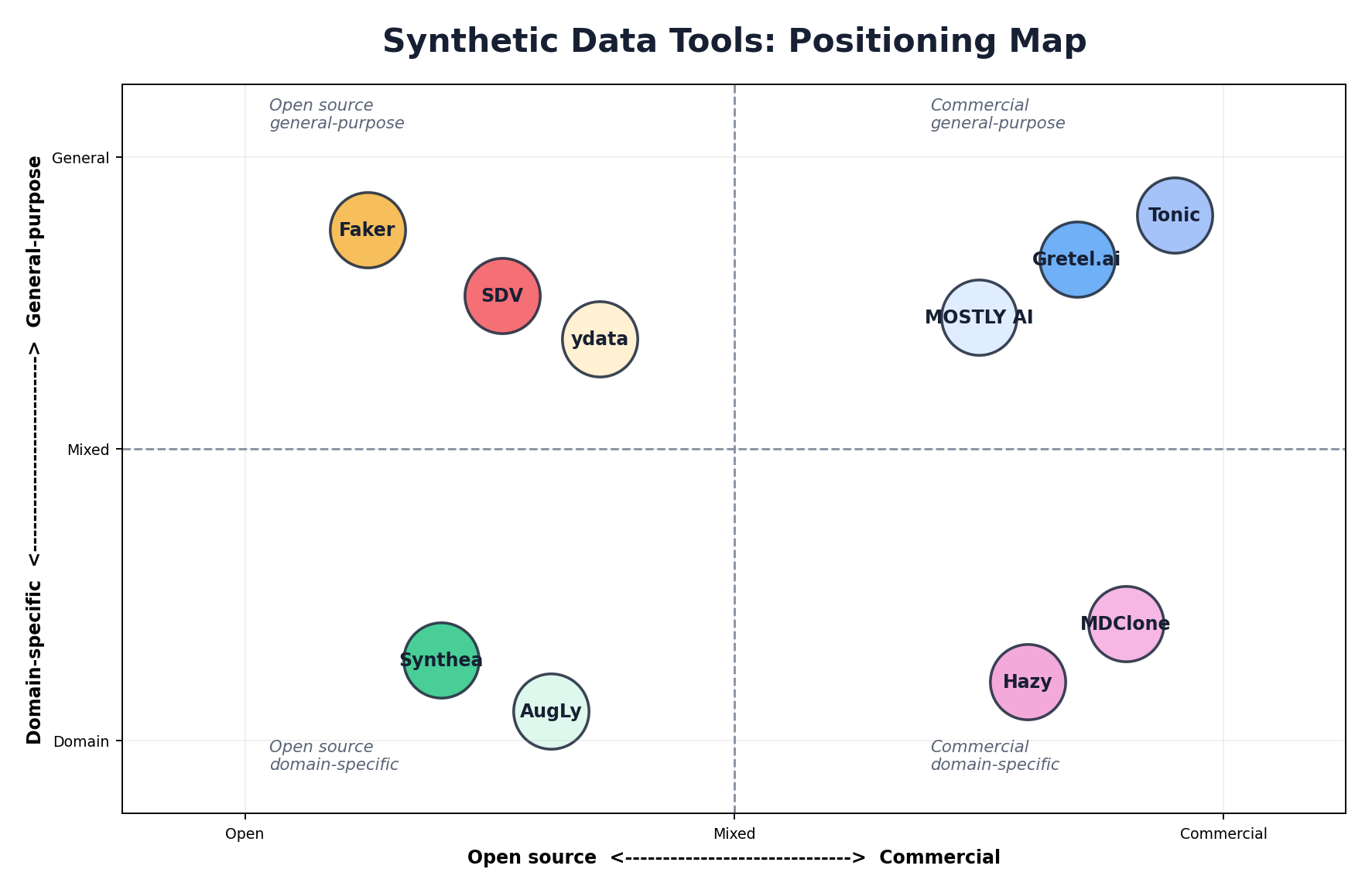
Open-source tools dominate in terms of accessibility and community contribution but often require significant engineering effort to operationalize. Commercial platforms offer polished user experiences and production guarantees but come with licensing costs. Specialized tools excel in their domain but may lack flexibility for cross-domain applications. The landscape continues to evolve, with new entrants and consolidation occurring regularly.
2. Synthetic Data Vault (SDV)
The Synthetic Data Vault (SDV) is the most popular open-source framework for tabular and relational data synthesis. Originally developed by the Data to AI Lab (DAI Lab) at MIT and now maintained by DataCebo, SDV provides a comprehensive, batteries-included approach to synthetic data generation with minimal boilerplate code.
Architecture Overview
SDV operates on a straightforward pipeline: fit a model on real data, then generate synthetic samples. The framework abstracts away model complexity through high-level APIs while exposing lower-level controls for advanced users. The architecture cleanly separates data preprocessing, model selection, and sampling.
Synthesis Models
GaussianCopula: The simplest and fastest SDV model. It assumes multivariate Gaussian distributions and captures linear correlations through copula methods. Ideal for quick prototyping and datasets with mild non-linearity.
CTGAN (Conditional Tabular GAN): A deep learning model specifically designed for mixed-type tabular data. CTGAN handles categorical and continuous variables natively without preprocessing. It captures complex non-linear relationships and achieves higher utility on diverse datasets.
TVAE (Tabular Variational Autoencoder): A VAE-based approach that provides smoother sampling and better mode coverage than CTGAN on certain datasets. Often exhibits superior privacy properties due to the regularization inherent in VAE training.
CopulaGAN: Combines copula methods with GAN training. Offers a middle ground between CTGAN's expressiveness and GaussianCopula's stability.
HMA (Hierarchical Modeling Algorithm): For relational databases with parent-child relationships. Models foreign key constraints explicitly, ensuring referential integrity in synthetic data.
Getting Started with SDV
from sdv.datasets.demo import download_demo
from sdv.single_table import GaussianCopulaSynthesizer
from sdmetrics.reports.single_table import QualityReport

# Load example data and metadata
real_data, metadata = download_demo(
    modality='single_table',
    dataset_name='fake_hotel_guests'
)

# Fit a Gaussian copula synthesizer
synthesizer = GaussianCopulaSynthesizer(metadata)
synthesizer.fit(real_data)

# Generate synthetic samples (same shape as real data)
synthetic_data = synthesizer.sample(num_rows=len(real_data))

# Evaluate synthetic data quality
report = QualityReport()
report.generate(real_data, synthetic_data, metadata, verbose=False)
print(f"Quality Score: {report.get_score():.2%}")
print(report.get_properties())
Advanced: CTGAN with Custom Configuration
from sdv.single_table import CTGANSynthesizer
from sdv.metadata import Metadata

# Initialize CTGAN with custom hyperparameters
metadata = Metadata.detect_from_dataframe(data=real_data)
synthesizer = CTGANSynthesizer(
    metadata,
    epochs=500,
    batch_size=500,
    embedding_dim=128,
    generator_dim=(256, 256),
    discriminator_dim=(256, 256),
    generator_decay=1e-6,
    discriminator_decay=0,
    discriminator_steps=1,
    verbose=True
)

# Fit on your data
synthesizer.fit(real_data)

# Generate synthetic rows
synthetic_data = synthesizer.sample(num_rows=5000)

# Check constraint satisfaction
print(f"Rows: {len(synthetic_data)}")
print(f"Columns: {list(synthetic_data.columns)}")Handling Relationships with HMA
from sdv.multi_table import HMASynthesizer
from sdv.metadata import Metadata

# Define your relational schema from the table dictionary
metadata = Metadata.detect_from_dataframes(data={
    'customers': customers_df,
    'orders': orders_df
})

# Model respects relationships
synthesizer = HMASynthesizer(metadata)
synthesizer.fit({
    'customers': customers_df,
    'orders': orders_df
})

# Generate maintains referential integrity
synthetic_data = synthesizer.sample()
print(synthetic_data['orders'].head())
3. Faker
Faker is the go-to library for generating realistic but entirely fake personally identifiable information (PII) and structured data. Unlike statistical synthesis methods, Faker uses predefined templates and randomization to generate data that looks real but has no connection to actual individuals.
Core Use Cases
Faker excels at generating test data for application development, populating demo databases, creating realistic but privacy-safe development environments, and generating synthetic PII for testing data privacy controls. It's not designed for statistical similarity to a real dataset, but rather for generating plausible-looking data that passes basic validation checks.
Common Use Cases with Code
from faker import Faker
import csv

fake = Faker()

# Generate individual records
print(fake.name())           # Output: Margaret Wilson
print(fake.email())          # Output: jsmith@example.org
print(fake.address())        # Output: 123 Main St, Anytown, USA
print(fake.phone_number())   # Output: (555) 123-4567
print(fake.ssn())            # Output: 123-45-6789

# Generate a CSV file of synthetic customers
with open('synthetic_customers.csv', 'w', newline='') as f:
    writer = csv.writer(f)
    writer.writerow(['id', 'name', 'email', 'phone', 'date_joined'])

    for i in range(10000):
        writer.writerow([
            i,
            fake.name(),
            fake.email(),
            fake.phone_number(),
            fake.date_time_this_year()
        ])

print("Generated 10,000 synthetic customer records")
Advanced: Seeding and Reproducibility
from faker import Faker

# Seed the generator for reproducibility
Faker.seed(42)

fake = Faker()

# Generate the same data every time
names = [fake.name() for _ in range(5)]
print(names)  # Same output on every run

# Multiple providers in different locales
fake_de = Faker('de_DE')
fake_fr = Faker('fr_FR')

print(fake_de.name())  # German name
print(fake_fr.name())  # French name

# Create realistic test data with relationships
def generate_user_records(count):
    Faker.seed(42)
    fake = Faker()

    records = []
    for i in range(count):
        records.append({
            'user_id': i,
            'name': fake.name(),
            'email': fake.email(),
            'created_at': fake.date_time_this_year(),
            'last_login': fake.date_time_this_month(),
            'country': fake.country_code()
        })

    return records

users = generate_user_records(1000)
print(f"Generated {len(users)} users")4. Gretel.ai
Gretel.ai is a commercial platform designed for enterprise synthetic data generation with a focus on privacy, compliance, and usability. The platform combines multiple synthesis techniques, provides a web-based interface, and offers APIs for programmatic access.
Key Components
Gretel Synthetics: The core synthesis engine supporting both tabular and text data. Offers multiple model types optimized for different data characteristics and privacy requirements.
Gretel Navigator: A data discovery and governance tool that catalogs sensitive columns and recommends privacy protection measures before synthesis.
Web Interface: Intuitive dashboard for uploading data, configuring models, generating synthetic data, and evaluating quality metrics.
API Usage Example
gretel_client project-based workflow. Newer versions expose Gretel.factories and a simpler gretel.submit_train()/submit_generate() flow. Consult the current Gretel docs for the exact API in the version you install.
import gretel_client
from gretel_client.projects import create_project

# Initialize client with API key
api_key = "your-api-key"
client = gretel_client.get_client(api_key=api_key)

# Create a project
project = create_project(display_name="Credit Card Fraud Detection")

# Upload source data
project.upload_file("transaction_history.csv")

# Configure synthesis model
model_config = {
    "models": [
        {
            "synthetics": {
                "params": {
                    "max_rows": 500000,
                    "epochs": 200,
                    "batch_size": 64
                }
            }
        }
    ]
}

# Train the model
record_handler = project.create_record_handler_from_file(
    "transaction_history.csv",
    model_config=model_config
)

# Poll for completion
record_handler.wait_for_completion()

# Download synthetic data
synthetic_data = record_handler.get_synthetic_data()
print(f"Generated {len(synthetic_data)} synthetic records")
Gretel's commercial offering provides production-grade infrastructure, compliance certifications (HIPAA, SOC 2), and enterprise support. The platform handles scalability, monitoring, and data governance concerns that teams would otherwise need to manage themselves.
5. MOSTLY AI
MOSTLY AI is an enterprise platform emphasizing privacy-first synthetic data generation with a focus on data sharing and collaboration. The platform is known for its speed, ease of use, and strong privacy guarantees.
Core Strengths
Speed: MOSTLY AI trains models significantly faster than many competitors, often completing synthesis in minutes rather than hours. This enables rapid iteration and testing.
Privacy Focus: The platform emphasizes differential privacy and membership inference attack resistance. Enterprise customers appreciate the explicit privacy-first positioning.
Ease of Use: Minimal configuration required; the platform auto-detects data types and column relationships, setting sensible defaults.
Enterprise Features: Role-based access control, audit logging, compliance frameworks (GDPR, HIPAA, etc.), and data lineage tracking.
Workflow Example
mostlyai) that is simpler than the raw REST calls below. The HTTP snippet is included for transparency about what the SDK does under the hood; for production use, prefer from mostlyai.sdk import MostlyAI and follow the current SDK docs — endpoint paths and payload shapes have changed across API versions.
# MOSTLY AI API usage
import requests
import json

API_KEY = "your-api-key"
API_URL = "https://api.mostly.ai/v2"

headers = {
    "Authorization": f"Bearer {API_KEY}",
    "Content-Type": "application/json"
}

# Create a project
project_payload = {
    "name": "Customer Data Synthesis",
    "description": "Generating synthetic customer records for testing"
}

project_response = requests.post(
    f"{API_URL}/projects",
    headers=headers,
    json=project_payload
)

project_id = project_response.json()["id"]

# Upload source data
with open("customers.csv", "rb") as f:
    files = {"file": f}
    upload_response = requests.post(
        f"{API_URL}/projects/{project_id}/datasets",
        headers={"Authorization": f"Bearer {API_KEY}"},
        files=files
    )

dataset_id = upload_response.json()["id"]

# Start synthesis
synthesis_payload = {
    "dataset_id": dataset_id,
    "config": {
        "record_limit": 100000
    }
}

synthesis_response = requests.post(
    f"{API_URL}/projects/{project_id}/synthetics",
    headers=headers,
    json=synthesis_payload
)

synthesis_id = synthesis_response.json()["id"]

# Poll until complete
while True:
    status = requests.get(
        f"{API_URL}/projects/{project_id}/synthetics/{synthesis_id}",
        headers=headers
    ).json()

    if status["status"] == "completed":
        print(f"Synthesis complete! Download at: {status['download_url']}")
        break
    elif status["status"] == "failed":
        print(f"Synthesis failed: {status['error']}")
        break
6. Synthea
Synthea is a specialized generator for synthetic medical records. Rather than applying generic synthesis techniques to healthcare data, Synthea simulates patient lifecycles using disease progression models, treatment workflows, and clinical decision logic. The result is highly realistic, clinically coherent synthetic medical records in FHIR (Fast Healthcare Interoperability Resources) format.
Key Characteristics
Synthea generates synthetic patients by simulating their entire medical journey from birth to death or present day. Each patient has a complete medical history including diagnoses, medications, procedures, and test results that are clinically consistent and plausible. The generator respects medical knowledge constraints (e.g., a patient cannot be prescribed a drug to which they have a documented allergy).
The output format is FHIR-compliant, making it directly compatible with modern healthcare IT systems and databases. This is a significant advantage over generic synthetic data tools that produce CSV files requiring additional transformation for healthcare workflows.
Running Synthea
# Clone and build Synthea
git clone https://github.com/synthetichealth/synthea.git
cd synthea
./gradlew build

# Generate synthetic patients
./run_synthea Massachusetts -p 10000

# Generate specific disease states
./run_synthea Massachusetts -p 5000 -m diabetes

# Generate and export to FHIR JSON
./run_synthea --state Massachusetts --population 1000 \
  --exporter.fhir.export true \
  --exporter.csv.export false \
  --exporter.ccda.export false

# Output will be in output/fhir/ directory
# Each patient is a separate FHIR Bundle JSON file
Synthetic Patient Example (FHIR)
{
  "resourceType": "Bundle",
  "id": "synthea-patient-bundle",
  "entry": [
    {
      "resource": {
        "resourceType": "Patient",
        "id": "example123",
        "name": [{
          "given": ["John"],
          "family": "Smith"
        }],
        "birthDate": "1965-08-15",
        "gender": "male"
      }
    },
    {
      "resource": {
        "resourceType": "Condition",
        "id": "cond-diabetes",
        "code": {
          "coding": [{
            "system": "http://snomed.info/sct",
            "code": "44054006",
            "display": "Diabetes mellitus type 2"
          }]
        },
        "subject": {"reference": "Patient/example123"},
        "onsetDateTime": "2010-03-15"
      }
    }
  ]
}
7. ydata-synthetic
ydata-synthetic is a Python library designed for both tabular and time-series synthetic data generation. It provides a clean, scikit-learn-like API and supports multiple synthesis models optimized for different data types.
Tabular Data Synthesis
ydata-sdk suite. The snippets below use the classic ydata-synthetic API (RegularSynthesizer with ModelParameters/TrainParameters) that was stable through 2023. Check the current package README before copying — class names and constructor arguments change frequently.
from ydata_synthetic.synthesizers.regular import RegularSynthesizer
from ydata_synthetic.synthesizers import ModelParameters, TrainParameters
import pandas as pd

# Load real data
real_data = pd.read_csv("transaction_data.csv")
num_cols = [c for c in real_data.columns if c not in ('category', 'region')]
cat_cols = ['category', 'region']

# Configure the synthesizer (CTGAN-style model)
model_args = ModelParameters(
    batch_size=500,
    lr=2e-4,
    betas=(0.5, 0.9),
    noise_dim=128,
    layers_dim=128,
)
train_args = TrainParameters(epochs=300)

# Create and train
synth = RegularSynthesizer(modelname='ctgan', model_parameters=model_args)
synth.fit(data=real_data, train_arguments=train_args,
          num_cols=num_cols, cat_cols=cat_cols)

# Generate synthetic data
synthetic_data = synth.sample(n_samples=len(real_data))
For evaluation, pair the output with sdmetrics or ydata's own profiling tools rather than a bundled metrics module — the older ydata_synthetic.metrics namespace has been deprecated.
Time-Series Synthesis
from ydata_synthetic.synthesizers.timeseries import TimeSeriesSynthesizer
from ydata_synthetic.synthesizers import ModelParameters, TrainParameters
import pandas as pd

# Prepare time-series data
ts_data = pd.read_csv("stock_prices.csv", index_col='date', parse_dates=True)

# Configure (TimeGAN-style model)
model_args = ModelParameters(
    batch_size=128,
    lr=5e-4,
    noise_dim=32,
    layers_dim=128,
)
train_args = TrainParameters(epochs=200, sequence_length=30,
                             number_sequences=len(ts_data) // 30)

# Train
synth = TimeSeriesSynthesizer(modelname='timegan', model_parameters=model_args)
synth.fit(data=ts_data, train_arguments=train_args,
          num_cols=list(ts_data.columns))

# Generate synthetic time series (returns list of sequence DataFrames)
synthetic_ts = synth.sample(n_samples=1000)
8. Augly (Meta)
Augly is Meta's open-source library for data augmentation across images, text, audio, and video. While technically data augmentation rather than synthesis, Augly creates variations of existing data points—a common need in machine learning workflows.
Image Augmentation
import augly.image as imaugs
from PIL import Image

# Load an image
img = Image.open("product.jpg")

# Apply transformations
augmented_1 = imaugs.rotate(img, degrees=15)
augmented_2 = imaugs.blur(img, radius=5)
augmented_3 = imaugs.brightness(img, factor=1.3)
augmented_4 = imaugs.crop(img, x1=10, y1=10, x2=200, y2=200)

# Save augmented versions
augmented_1.save("product_rotated.jpg")
augmented_2.save("product_blurred.jpg")
Text Augmentation
import augly.text as textaugs

text = "The synthetic data generation process is complex."

# Apply text transformations
aug_1 = textaugs.insert_punc(text)
aug_2 = textaugs.change_case(text)
aug_3 = textaugs.swap_words(text)
aug_4 = textaugs.insert_typos(text)

print(aug_1)  # Output: "The synthetic data generation process, is complex."
print(aug_2)  # Output: "THE SYNTHETIC DATA GENERATION PROCESS IS COMPLEX."
print(aug_3)  # Output: "process synthetic data generation The is complex."
print(aug_4)  # Output: "The synthtic data genartion proces is complex."
9. Other Notable Tools
DataSynthesizer
DataSynthesizer is a Python library for differentially private synthesis. It's lightweight, particularly strong for categorical data, and includes formal privacy guarantees. The library is smaller and more accessible than SDV for certain use cases.
Synthpop (R)
An R package for statistical synthesis with strong roots in the official statistics community. Synthpop excels at synthesizing survey data and maintaining multivariate relationships. Essential for R-centric organizations.
SDGym
A benchmarking framework for evaluating synthetic data generation models. Provides standardized datasets and metrics for comparing the quality of different synthesis approaches. Useful for model selection.
SDMetrics
A companion library to SDV providing comprehensive evaluation metrics: utility (similarity to real data), privacy (membership inference risk, re-identification risk), and fidelity (distributional coverage).
10. Choosing the Right Tool
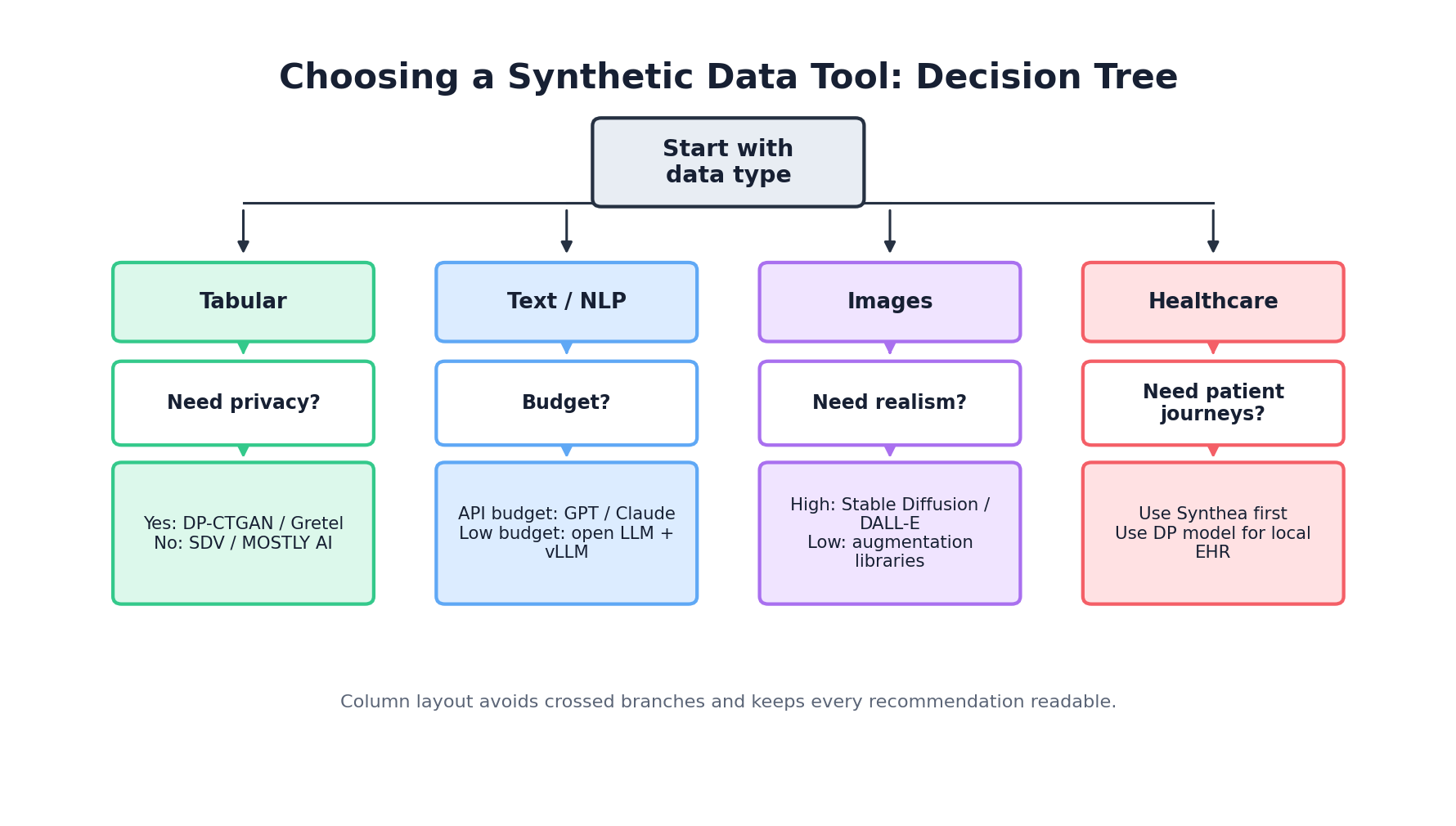
Selecting a synthetic data tool requires evaluating multiple dimensions: data type, privacy requirements, scale, budget, and organizational capabilities. There is no universally optimal tool; rather, different tools excel in different contexts.
Decision Framework
Step 1: Identify Your Data Type
- Tabular: SDV, Gretel, MOSTLY AI, ydata-synthetic, DataSynthesizer
- Healthcare: Synthea (if FHIR required), SDV (if not)
- Time-Series: ydata-synthetic, CTGAN (via SDV)
- Images/Text: Augly (augmentation), diffusion models (generation), GANs
Step 2: Assess Privacy Requirements
- Formal Privacy Guarantees (DP): DataSynthesizer, ydata-synthetic with DP, MOSTLY AI
- Heuristic Privacy: SDV, Gretel, commercial platforms
- Compliance Critical: Gretel (SOC 2, HIPAA), MOSTLY AI (GDPR-first)
Step 3: Evaluate Scale & Performance
- Millions of Rows: MOSTLY AI (fast), Gretel (scalable), CTGAN
- Hundreds of Columns: GaussianCopula (fast), HMA (relational)
- Low Latency Inference: GaussianCopula, Faker
Step 4: Consider Budget & Organization
- Open Source Preference: SDV, ydata-synthetic, Synthea, Faker
- Managed Service Preferred: Gretel, MOSTLY AI
- Enterprise/Compliance Critical: Commercial offerings worth cost
Comprehensive Comparison Table
| Tool | Data Type | License | Scale | Privacy (DP) | Ease of Use | Cost |
|---|---|---|---|---|---|---|
| SDV | Tabular, Relational | Open Source | 100K - 10M rows | No | High | Free |
| CTGAN (SDV) | Tabular | Open Source | 1M+ rows | No | Medium | Free |
| ydata-synthetic | Tabular, Time-Series | Open Source | 1M+ rows | Yes (optional) | High | Free |
| Faker | PII/Structured | Open Source | Unlimited | N/A | Very High | Free |
| DataSynthesizer | Tabular | Open Source | 100K - 1M rows | Yes | Medium | Free |
| Synthea | Healthcare (FHIR) | Open Source | 10K - 1M patients | No | Low (requires Java) | Free |
| Gretel.ai | Tabular, Text | Commercial | 1M+ rows | Yes | Very High | $$$$ |
| MOSTLY AI | Tabular | Commercial | 10M+ rows | Yes | Very High | $$$ |
| Augly | Image, Text, Audio, Video | Open Source | Unlimited | No (augmentation) | High | Free |
| Synthpop | Tabular (Survey) | Open Source | 100K - 1M rows | No | Low (R required) | Free |
11. Building Your Own Generator
When off-the-shelf tools don't meet your requirements, custom generators become necessary. This happens when you have domain-specific constraints, highly specialized data structures, or extreme scale/latency requirements. Building custom generators is non-trivial but achievable with the right architecture.
Architecture Patterns
Pattern 1: Rule-Based Generation For highly constrained domains (e.g., financial transactions), explicitly encode business rules and constraints. Generate values randomly within those constraints. Simple, interpretable, but brittle if constraints change frequently.
Pattern 2: Template-Based Generation Store templates of valid records, apply randomization and substitution. Works well for semi-structured data. Similar to Faker's approach but domain-specific.
Pattern 3: Hybrid Statistical + Rule-Based Use statistical models (GaussianCopula, VAE) for base distributions, apply rule-based validation and constraint satisfaction. Balances realism with correctness. Most enterprises end up here.
Pattern 4: Simulation-Based If your data generation process resembles real-world events, simulate those events. Used in Synthea for healthcare, common in manufacturing and logistics. Requires substantial domain expertise but produces maximally realistic data.
Minimal Custom Generator Example
import pandas as pd
import numpy as np
from datetime import datetime, timedelta
import random

class CustomTransactionGenerator:
    """Simple transaction generator with domain constraints"""

    def __init__(self, num_merchants=100, num_cardholders=10000):
        self.merchants = [f"MERCHANT_{i}" for i in range(num_merchants)]
        self.cardholders = [f"CARDHOLDER_{i}" for i in range(num_cardholders)]
        self.categories = ['GROCERIES', 'GAS', 'DINING', 'RETAIL', 'ENTERTAINMENT']

    def generate_amount(self, category):
        """Generate transaction amount constrained by category"""
        ranges = {
            'GROCERIES': (10, 150),
            'GAS': (20, 80),
            'DINING': (15, 100),
            'RETAIL': (30, 500),
            'ENTERTAINMENT': (10, 200)
        }
        min_amt, max_amt = ranges[category]
        return round(np.random.uniform(min_amt, max_amt), 2)

    def generate_record(self, base_date):
        """Generate a single synthetic transaction"""
        category = random.choice(self.categories)

        # Enforce business rules
        merchant = random.choice(self.merchants)
        cardholder = random.choice(self.cardholders)
        amount = self.generate_amount(category)

        # Transactions tend to occur during business hours
        hour = int(np.random.normal(14, 4))  # Centered around 2 PM
        hour = max(0, min(23, hour))  # Clamp to 0-23

        timestamp = base_date + timedelta(
            hours=hour,
            minutes=random.randint(0, 59)
        )

        # Fraud: 0.5% of transactions
        is_fraud = random.random() < 0.005

        return {
            'merchant': merchant,
            'cardholder': cardholder,
            'amount': amount,
            'category': category,
            'timestamp': timestamp,
            'is_fraud': is_fraud
        }

    def generate(self, num_records=10000):
        """Generate dataset of synthetic transactions"""
        base_date = datetime.now() - timedelta(days=365)

        records = [
            self.generate_record(base_date + timedelta(days=i % 365))
            for i in range(num_records)
        ]

        return pd.DataFrame(records)

# Usage
generator = CustomTransactionGenerator()
synthetic_df = generator.generate(num_records=100000)
print(synthetic_df.head(10))
print(f"\nFraud rate: {synthetic_df['is_fraud'].mean():.3%}")Testing Your Generator
def validate_synthetic_data(df, generator):
    """Validate synthetic data meets constraints"""

    errors = []

    # Check required columns
    required_cols = ['merchant', 'cardholder', 'amount', 'category', 'timestamp']
    if not all(col in df.columns for col in required_cols):
        errors.append("Missing required columns")

    # Check data types
    if not pd.api.types.is_numeric_dtype(df['amount']):
        errors.append("Amount must be numeric")

    # Check business constraints
    for _, row in df.iterrows():
        # Amount must match category constraints
        min_amt, max_amt = {
            'GROCERIES': (10, 150),
            'GAS': (20, 80),
            'DINING': (15, 100),
            'RETAIL': (30, 500),
            'ENTERTAINMENT': (10, 200)
        }[row['category']]

        if not (min_amt <= row['amount'] <= max_amt):
            errors.append(f"Amount {row['amount']} invalid for category {row['category']}")

    # Check fraud rate is reasonable (should be ~0.5%)
    fraud_rate = df['is_fraud'].mean()
    if fraud_rate < 0.003 or fraud_rate > 0.007:
        errors.append(f"Fraud rate {fraud_rate:.2%} outside expected range")

    return errors

# Run validation
errors = validate_synthetic_data(synthetic_df, generator)
if errors:
    print("Validation failed:")
    for error in errors[:10]:  # Print first 10 errors
        print(f"  - {error}")
else:
    print("✓ All validations passed")
Conclusion
The synthetic data generation landscape offers tools for virtually every use case, from simple PII generation with Faker to sophisticated privacy-preserving synthesis with Gretel and MOSTLY AI. Open-source tools like SDV provide flexibility and cost savings; commercial platforms deliver ease of use and compliance support.
Success requires aligning tool selection with your specific requirements: data type, privacy model, scale, and organizational constraints. Begin with the simplest tool that solves your problem, measure results empirically, and graduate to more complex approaches only when justified by your requirements.
References and Further Reading
- (2026). Synthetic Data Vault Documentation. docs.sdv.dev/sdv
- (2026). Single Table Synthesizers. Synthetic Data Vault. docs.sdv.dev/SDV/single-table-data/modeling/synthesizers
- (2026). Quality Report. SDMetrics Documentation. docs.sdv.dev/sdmetrics/reports/quality-report
- (2026). Faker Documentation. faker.readthedocs.io/en/master
- (2026). Gretel Documentation. docs.gretel.ai
- (2026). CLI and SDK Environment Setup. docs.gretel.ai/gretel-basics/getting-started/environment-setup/cli-and-sdk
- (2026). MOSTLY AI Python SDK. mostly.ai/docs/python-sdk
- (2018). Synthea: An Approach, Method, and Software Mechanism for Generating Synthetic Patients and the Synthetic Electronic Health Care Record. Journal of the American Medical Informatics Association. academic.oup.com/jamia/article/25/3/230/4821152
- (2026). Models. OpenAI API Documentation. platform.openai.com/docs/models